

Troubleshooting & FAQ
If any questions or issues aren't addressed here, please ask in the Xii-Labs Discord Server. Also, it may be helpful to read through the original worklogs on BitBuilt.
Common Issues
Wii Fails to Boot After Trim
- Inspect the board for obvious signs of damage. Are any components on the edge cut in half? Are any important components or traces sliced (refer to the diagrams)?
- Check the voltage line resistances! Did any of them seem abnormally low or high? If so, inspect the board for any obvious issues, or consider sanding more to achieve a smoother finish.
- Check for continuity between the voltage and ground lines from the RVL-PMS2 to the Wii. If everything checks out, test the voltages coming out of the RVL-PMS2. Remember, to power it on, it needs a 3-4 second button press (short on the “BTN” pad to GND).
- Ensure the
U10pad on the RVL-PMS2 has a solid connection to the U10 via on the Wii. If this via gets torn or damaged, there is no alternative point. - Do the Hollywood and Broadway chips get progressively hotter when the system is powered on? If so, the Wii has likely booted, and the issue may lie in the video wiring. The outside of the RCA jack tip should have continuity with
GND, and the inside prong with the composite pin on the AVE.
Random “Exception (DSI) occurred!” Errors
These can be tricky to troubleshoot. If they are truly random and don’t only occur in a particular game, check the USB data line area of the Xii-Flex Ultra. A poor or cold connection can cause interference or read issues, leading to errors. The error can also be triggered by a loose or inconsistent connection on one of the voltage rails. Ensure there is continuity on all of them from the Wii to the RVL-PMS2.
“RVLoader Failed to Initialize Fat FS!” Error
This error can occur if there is a break in the USB Data + (D+) and Data - (D-) lines. Ensure that there is continuity between the D+ and D- pads on the PMS-PD3 and the USB vias on the Wii/Xii-Flex Ultra. The error can also be triggered by a loose or inconsistent connection on one of the voltage rails. Ensure there is continuity on all of them.
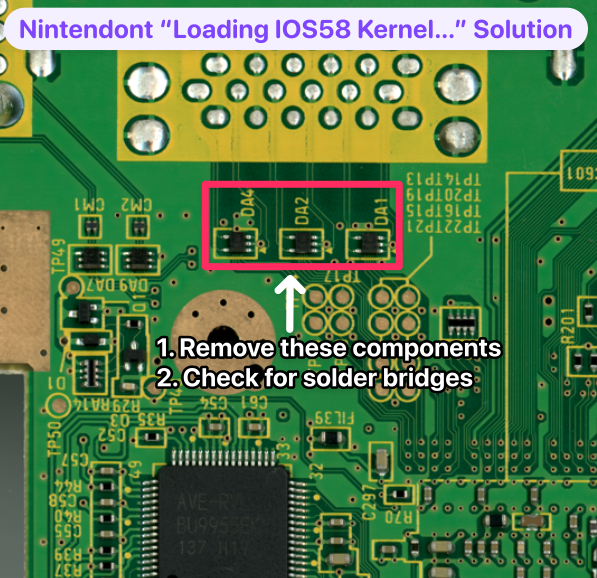
Nintendont Stuck at “Loading IOS58 Kernel…”
- Ensure that the Xii-Boy Ultra has the latest version of RVLoader installed. The latest version can be found under the releases section on RVLoader's GitHub page.
- Remove the GameCube memory card components (
DA4,DA2, andDA1) on top of the back of the trimmed Wii. If they are removed and the issue persists, check for solder bridges between those solder pads.
RVLoader Crashes, System Freezes, or I2C Errors
If the build is experiencing one or more of the following symptoms:
- Random crashes
- System Freezes
- Temperature displaying
-273°C - Battery only reading 0%
- GC+ version switching between
GC+1.0andGC+2.0in the settings menu
Then the first step is to ensure that the Xii-Boy Ultra has the latest version of RVLoader installed. The latest version can be found under the releases section on RVLoader's GitHub page.
If that does not solve the issue, check the I2C traces on the Xii-Flex Ultra. A poor or cold connection can cause interference or read issues, leading to errors.
If temps reading at -273°C is the only issue at hand, then check the connections on the thermistor pads: 1.8v and T-. There should be a resistance of 9kΩ-10kΩ across the thermistor.
Fuzzy Display or Poor Image Quality
- Ensure the display and RVL-DD both have solid connections to their connectors and carrier PCBs.
- If the issue persists, download Settings Editor GUI by JoostinOnline and extract the Homebrew application to the
/apps/folder in the root of the Xii-Boy’s SD card. - Navigate to the Homebrew section in RVLoader and boot Settings Editor GUI. Change the video mode to
480p (Progressive). Exit, and test if the issue is resolved.
No Power and Flashing Multi-Colored LED
Make sure one or both batteries are installed. If the USB-C port is receiving power but can’t find batteries to charge, this issue occurs. If installing the batteries does not resolve it, check the connection between the PMS-PD3 and the Main PCB.